
3D prototyping is the bridge between a "napkin sketch" and a finished product. It’s an iterative process that allows designers and engineers to test form, fit, and function before committing to expensive mass production.
Here are the key aspects that define the world of 3D prototyping:
1. The Prototyping Workflow
The journey from concept to physical object generally follows a standard pipeline. Understanding this flow is crucial because a bottleneck in the digital stage will inevitably ruin the physical output.
CAD Modeling: Creating a digital twin using software like SolidWorks, Fusion 360, or Blender.
Slicing: Converting that 3D model into "layers" (G-code) that a machine can understand.
Fabrication: The actual build process (printing, milling, or casting).
Post-Processing: Cleaning, sanding, or curing the part to meet final specifications.
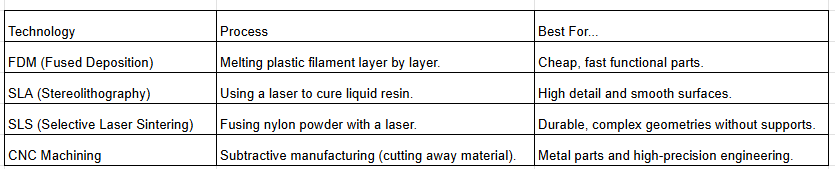
2. Core Technologies
Not all prototypes are created equal. The method you choose depends on your budget and what you’re trying to prove.
3. Levels of Fidelity
In the industry, we categorize prototypes by how much they actually resemble the final product:
Low-Fidelity (Proof of Concept): Cardboard, basic 3D prints, or foam. It answers the question: "Does the basic idea work?"
Medium-Fidelity (Form Study): Looks like the real thing but might not function. It answers: "Does it look right and feel good in the hand?"
High-Fidelity (Functional Prototype): Made of the final materials and fully operational. It answers: "Will it break under stress in the real world?"
4. Rapid Iteration (The "Fail Fast" Rule)
The "Rapid" in Rapid Prototyping is the most important part. The goal is to identify design flaws as early as possible.
Cost Efficiency: It is significantly cheaper to fix a digital file and reprint a $5 plastic part than it is to re-tool a $50,000 steel injection mold.
User Testing: Getting a physical object into a user’s hands provides feedback that a screen simply cannot.
Pro-Tip: Always design for the specific manufacturing process. For example, if you're using FDM, you need to consider "overhangs"—the printer can't print on thin air, so you'll need support structures!